Quickstart
The fastest way to see what KINETK returns is the Playground. You don’t write any code there, and every query in these docs can be run from it.
1. Get an API key
Sign in to the KINETK platform, open API keys, and create one. Keys look like ktk_live_…. The secret is shown once, when you create it, so store it right away. You can’t retrieve it later, only revoke it and issue a new one.
Paid calls use credits (1 credit = $1.00 USD), which you buy on the platform’s billing page. The narrative and pattern reads are free. See Pricing & Credits.
2. Head to the Playground
Open the Playground. Ask a question in plain English, pick a time window and analysis depth, and run it against the live API. The result opens as a visual report, and the complete JSON is one click away.
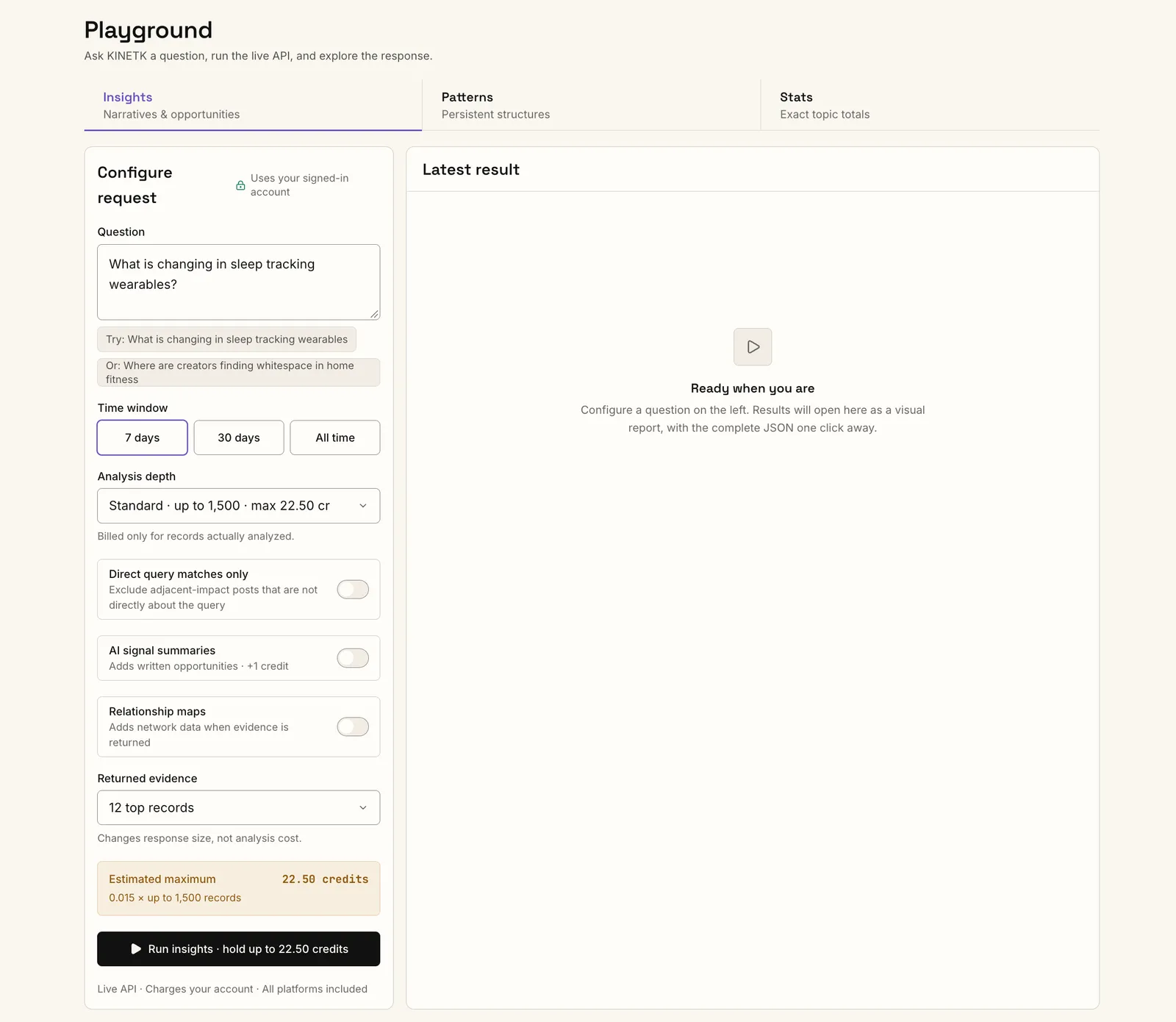
Each Playground tab runs one of the analysis jobs:
The Playground uses your signed-in account, so you don’t paste a key. Runs are charged to your account like any API call. Before you run, it shows the estimated maximum credits, and you’re billed only for the records actually analyzed. Use it to find the right question, window and depth, then copy those settings into your code.
3. Call the API from your code
When you’re ready to integrate, export your base URL and key. Every example in these docs uses them:
Check the service
A 200 with "status": "ok" means the service is up and its data is fresh. sync.minutesSinceLastRun shows how recently new content was ingested. See Sync & Freshness.
Search
POST /search returns ranked content for a query in one synchronous call, along with the narratives and creators that content belongs to:
This call costs 0.01 credits per record returned, so 20 records cost 0.2 credits. See Search.
Drill into a narrative (free)
Take a narrative id from the search and read its full evidence:
You get its member posts, top creators and per-platform breakdown. To browse what’s trending without a query:
The precomputed narrative and pattern reads are free. See Narrative Intelligence.
Run a full analysis (async)
This is the same analysis as the Playground’s Insights tab: narratives with corpus trajectory and sentiment, tag and theme signals, and platform opportunities. Submit an insights job:
limit sets how many records to analyze. At 0.015 credits per record, this job costs at most 7.5 credits. If you omit it, you get the default depth (1,500 records on 7d). The submit returns immediately:
Poll until it succeeds:
Poll every 2–5 seconds. status goes queued → running → succeeded, usually within a minute. The final response has the analysis in result. See Intelligence Jobs for all four job kinds.
4. Or let your AI assistant do it
Connect the hosted MCP to Claude, ChatGPT, Cursor or Codex and ask in plain English, for example “use kinetk to find what’s trending in sneaker drops this week”. The assistant searches narratives, walks the pattern map and runs jobs for you.
Authentication
Every API endpoint requires your secret key in the x-api-key header:
Each key is tied to a usage plan with per-second and per-day rate limits. The defaults are generous for development. Contact api@kinetk.ai for higher production limits.
Failure modes
Best practices
- Store keys in env vars or a secret manager, never in committed code. For AI assistants, use the hosted MCP’s sign-in where your client supports it, so you don’t paste a key at all.
- Use separate keys per environment so a leaked dev key never touches production traffic.
- Rotate keys when team members leave or after any suspected exposure. Revoke and re-create them in the platform; revocation takes effect immediately.
Next steps
- Choosing the Right Call: which endpoint fits which question, and how to keep costs down.
- Pricing & Credits: what each call costs and how holds work.
- API Reference: every endpoint, field and error.